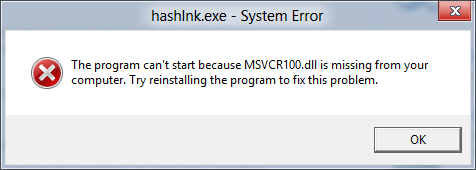
Fix “The program can’t start because MSVCR100.dll is missing from your computer.” error on Windows
Wednesday, April 18, 2012 posted by CSch
What hides behind this name is the Microsoft Visual C++ Redistributable which can easily be downloaded on the Microsoft website as x86 or x64 edition:
32 bit: http://www.microsoft.com/download/en/details.aspx?id=5555
64 bit: http://www.microsoft.com/download/en/details.aspx?id=14632
Usually the application that misses the dll indicates what version you need - if one does not work, simply install the other.


it is not working on my pc
Thanks, worked like a charm. Quick easy download. Quick an easy install. Prob solved. Thank you much.
Worked great for me with cinema4d saying i didnt have the .dll installed it c4d no longer gives me the error thanks a bunch!
My error window shows
avgul.exe system error
This program can’t start becausemfc110u.dll is missing from your computer.
Try reinstalling the program. to fix the problem.
If I reinstall AVG how do I know or can be assured it will not happen again. I used the uninstall on my programs control panel.
I also have a conduit background container that keeps popping up after an uninstall of OBit- Advanced System Care product. I actually bought a russian anti malware and anti virus that world great. But these error windows pop up at start up and nothing I do clears them. No registry clean up nadda nunca nothing.
good very good so good i whant play good
FINNALY. After searching of 1 hour I finnaly found this
Rim, you should be happy! For 2 days I’ve been working with technical support, obviously to no avail. Today I decided to “HELP” myself and found it in about an hour too.
~PEACE ON EARTH~
This did not work for me. While trying to install both versions I received an error message saying that a newer version of the redistributable has been detected on the machine and my computer does not meet the requirements for installation. But Hexchat still says the .dll is missing. I don’t know what to do.
Thanks buddy ,it works perfectly for me
sorry this didn’t work for me but thanks anyway
It really worked. Thanks for your support.
This did not work for me. While trying to install both versions I received an error message saying that a newer version of the redistributable has been detected on the machine and my computer does not meet the requirements for installation. But AVG still says the .dll is missing. I don’t know what to do.
I’m having the same problem as Barbara Jordan and M. Burns, namely:
“a newer version of the redistributable has been detected on the machine”
How can my pc be running a newer version than what I just downloaded from Microsoft.
Awesome all worked with Cinema 4d 64Bit
same problem here newer version has been installed but still not found the dll…
It works , thanks!
fantastic ,,,,, thanx very mush
Its worked for me
thnk u so much dear
It would have saved me a lot of time to find this answer first instead of trying 10 other things that did not work before finally finding the answer here.
Thanks Bro. Helped…
wow thanks
Its worked for me. finally my problem resolved
“same problem here newer version has been installed but still not found the dll…”
i have same problem with you..and then i try this installer:
for windows 7 x86 , try this:
32Bit: Microsoft Visual C++ 2010 SP1 Redistributable Package (x86)
it works for me
i am using 64bit os, and i try what it’s said but it didn’t work
it said that the new version already intalled
then i try to install x86(32bit) version of visual c++ and it’s work it solve my problem
same problem here newer version has been installed but still not found the dll…
please advise…
Thanks… it works perfectly… Superb.
I ran into this problem on a VM running v6 of Java and ASDM to manage Cisco ASAs. WhenI upgraded v6 to v7, this started happening. Reinstalling the Visual C++ libraries did not resolve it. Uninstalling v7 and rolling back to v6 did immediately. FYI
If running 64 bit, and your dll not found and you followed all methods do this:
Place yours emulator folder within Program files (your 32 bit one, not the 64). The program then references the dll in the correct folder
THANK YOU it worked
thanks a lot.. it’s really worked…
#Let’s Rockkkkk…
Worked like a charm!
THANKS U FOE FIXING MY PROBLEM
Thnx ya.. it realy worked for me! I installed WATCH DOGS and after installation it shows the problem msvcp100.dll is missing.. so i tried ur website and it works
Thanks a lot
Ran into the “newer version is installed” problem on my machine, followed Heriansayah’s advice and downloaded the 2010 SP1 .exe instead:
http://www.microsoft.com/en-US/download/confirmation.aspx?id=8328
Worked like a charm. Good luck!
Fixed my problem. Thanks
Installed both 64 and 32 bit versions and STILL having the same missing dll error. Any ideas?
Thank you. Worked like a charm!
Installed both but doesn’t work for me …
Any thing else i can try ?