Correct wrong system time in Windows 8

Thursday, April 12, 2012 posted by CSch

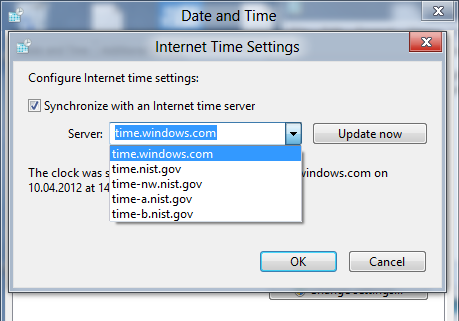
If you don’t synchronize your system clock with a time server, your clock will most likely miss the real time for one or two hours, even if you set your time zone and everything correctly. You can correct this easily by right-clicking the clock at the bottom right corner and selecting Adjust date/time. In the appearing window, go to the Internet Time tab and click on Change settings….
Tick Synchronize with an Internet time server and select time.windows.com from the drop-down menu; click Update now. The time should now be displayed correctly.
Be Sociable, Share!


14 Responses to “Correct wrong system time in Windows 8”

  1. Will says:

    What if we have to keep doing this? Is there something I can do to make it automatically update when I log in? I think it screws it up when I boot linux on the same machine then restart and boot Windows 8.

  2. Matt says:

    I have the same recurring problem dual booting with Linux. What is Win 8 doing differently than Win 7 did?

  3. Harjan says:

    I also have this problem. After bootup it’s 1 hour off. Clicking ‘update now’ fixes it. W7 didn’t have this problem

  4. Todd says:

    After upgrading HP G71 from Win 7 to Win 8, my system time will not stay to the time is set. Didnt notice the issue when first installed and after the first couple of update. I will and uninstall the last couple of
    updates to see whether or not it resolves.

  5. Roland says:

    After upgrading from Win7 to Win8 and after some weeks same problem occured

  6. Orrie Holmen says:

    The time is frozen on 4:10AM on PC in lower right-hand corner. Time server shows correct time but Windows won’t update.

  7. Adianis says:

    Doing this sets it to the wrong time. Apparently windows 8 doesnt know the time for the eastern time zone. Its right after i change it but get wrong again after awhile. Its frustrating to say the least.

    • Leeloo says:

      I ran into a similar issue; it was off by exactly 1 hour. If that’s what you’re running into go to “Adjust Date/Time” then “Change Time Zone” and make sure the “Automatically adjust clock for Daylight Saving Time” option is checked.

  8. JDC says:

    Same issue. Windows 8 on new laptop. Time is incorrect every time I log in. I am in Canada (EST) and in order for the laptop to show the correct time I had to choose Bogota time zone!

  9. Jason says:

    I had the same problem
    it would change the time manuelly, and when my pc started, the time would be off by 10 hours.
    the problem was that it was synching, but too the wrong timezone.
    (press change timezone)
    hope this helps someone out :D

  10. BigAl says:

    What clock in the bottom right corner? What the hell are you talking about? If I swipe on the right side to bring up the setting menu I get a clock in the bottom left corner, but I can’t click on that. Once computer is shut off or sleeps time is always 1 hour off. This is infuriating for a new OS. Why can’t MS get anything right or make anything simple to deal with?

  11. Seth says:

    Don’t forget to change the internet update website. Connect to something besides windows…worked for me.

    • Gill says:

      Thanks for this: I’d tried syncing via the internets but the clock would reset to the wrong time again. Changing the time server did the trick

  12. Mary says:

    I have just encountered this problem now, trying to sync. the internet time with windows makes the time a 3 hr difference.it won’t stay at 7:34 am ..although I enjoy the numbers It’s not 420 am!!!

Leave a Reply