FAQforge

  • Home

Categories

  • iPad & iPhone
  • Linux & Unix
    • Basics
    • Controlpanels
      • ISPConfig 2
      • ISPConfig 3
    • Distributions
      • CentOS
      • Debian
      • Ubuntu
    • Server
      • Email
      • FTP
      • MySQL
      • PostgreSQL
      • Webserver
    • Virtualisation
  • Mac OS X
  • Programming
  • Uncategorized
  • Windows
    • Vista
    • Windows 7
    • Windows 8
    • XP
  •  

Tags

7 apache automatic boot change cinnamon consumer Debian default delete desktop disable files Firefox install ISPConfig 2 ISPConfig 3 key Linux & Unix Linux & Unix manager menu metro mint MySQL password postfix powershell preview pure-ftpd registry remove screen script search Shell system Thunderbird Ubuntu virtualbox Vista Windows Windows 7 Windows 8 XP

Meta

  • Log in
« Troubleshoot and Improve power usage on Windows 7
Restore GRUB bootloader after Windows installation on multi-boot system »

Add own Windows logo in system properties

Thursday, May 3, 2012 posted by CSch
Tweet

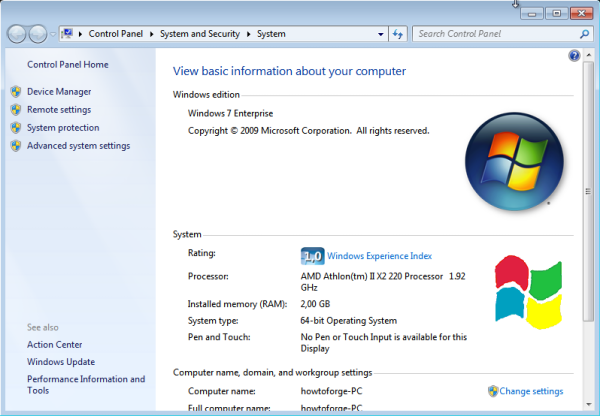
The system properties Window in Windows 7 has space for two Windows logos – one is the Windows logo that is shown by default on most systems and one is for manufacturers (computers by Dell and others will have their logo placed there). This manufacturer logo can be changed to an own picture using the registry.

- To start, edit the picture you want to use as logo. It has to be 120×120 pixel large and a bitmap file (.bmp, color range is up to you).
- Save the file into any directory now, I will choose C:\Windows\System32 for that but it can be any other. Name it oemlogo.bmp
- Open the registry by entering regedit into a Run… prompt. On the left column, navigate to the HKEY_LOCAL_MACHINE\Software\Microsoft\Windows\CurrentVersion\OEMInformation key.
- On the right column, if there is no value called Logo, create it by right-clicking the empty space and choosing New > String Value.
- Assign the full path of the picture to the Logo value (C:\Windows\System32\oemlogo.bmp).
- Close the registry and open the system properties window to view your beautiful new logo:
Be Sociable, Share!
  • Tweet
Tags: add, change, logo, manufacturer, oem, system properties, Windows 7
This entry was posted on Thursday, May 3rd, 2012 at 11:50 am and is filed under Windows, Windows 7. You can follow any responses to this entry through the RSS 2.0 feed. You can leave a response, or trackback from your own site.


Leave a Reply

Click here to cancel reply.

CAPTCHA-Image
Refresh

Imprint / Impressum - FAQforge is proudly powered by WordPress
Entries (RSS) and Comments (RSS)